Integrating security into the software development life cycle (SDLC) isn't just a "best practice"—it's an absolute must-have for building software that people can trust. The whole idea is to shift security left, which simply means we stop treating security as a final checkbox and start weaving it into every single stage of development. It’s about building security in, right from the start.
Why Bother with Security in the SDLC?
Think about building a house. Would you wait until the roof is on to check if the foundations are solid? Absolutely not. The same principle applies to software. Treating security as a last-minute inspection before you go live is like finding a crack in the foundation after you've already moved in. The fix will be messy, incredibly expensive, and probably not as good as if you'd done it right the first time.
When we talk about security in the SDLC, we mean making security part of the conversation at every step, from the initial brainstorming session all the way to long-term maintenance. This approach, sometimes called DevSecOps, changes the game. Security is no longer a gatekeeper slowing things down; it becomes a shared responsibility that helps developers write better, safer code from day one. It’s a complete switch from the old "find and fix" panic to a much smarter "prevent and protect" mindset.
And let's be clear, this isn't optional anymore. The fallout from poor security practices is real, and it hits businesses where it hurts.
The True Cost of Pushing Security to the End
When security gets ignored until the final stages, vulnerabilities get baked deep into the application's code and architecture. Trying to patch these problems after the product is already live is a nightmare. It costs a fortune and takes ages. Study after study has shown that a flaw fixed during the design phase is a tiny fraction of the cost of one found in production. For teams building on platforms like Supabase or Firebase, where speed is everything, these late-stage fire drills can kill momentum and burn through cash.
But the pain goes way beyond the financial hit. A security breach can trigger a cascade of problems:
- Damaged Reputation: Once you lose your customers' trust, it's incredibly hard to win it back. This can hurt more than any initial financial loss.
- Operational Chaos: Instead of building cool new features, your team is stuck in crisis mode, scrambling to patch holes and manage the incident.
- Hefty Fines: Data protection laws come with serious penalties for companies that don't get their security right.
The problem is huge. In the UK, the government's Cyber Security Breaches Survey found that a staggering 74% of large businesses had suffered a breach in the last year. This isn't a small-scale issue. It's why the National Cyber Security Centre (NCSC) has pushed for new codes of practice that force companies to build security in from the design phase, directly targeting the SDLC failures that lead to these breaches. You can dig into the details by reading the NCSC's latest survey findings.
"Shifting security left isn’t about piling more work onto developers. It's about empowering them with the right tools and knowledge to do their job securely. It’s the difference between building a fence at the top of a cliff and just parking an ambulance at the bottom."
By adopting a secure SDLC, your team can spot vulnerabilities when they're small and easy to fix, slash remediation costs, and ultimately ship more reliable products, faster. In this guide, we'll show you exactly how to do it.
Weaving Security Into Every SDLC Phase
To get security right, you have to stop treating it like a final inspection at the end of an assembly line. It needs to be an essential ingredient, mixed in from the very beginning. When you start thinking about security from the first conversation, it stops being a bottleneck and becomes a powerful way to build better, more resilient software. This phase-by-phase approach ensures security is baked in, not bolted on.
The diagram below shows this evolution perfectly, moving from the old-school, reactive model to a modern, integrated Secure SDLC.
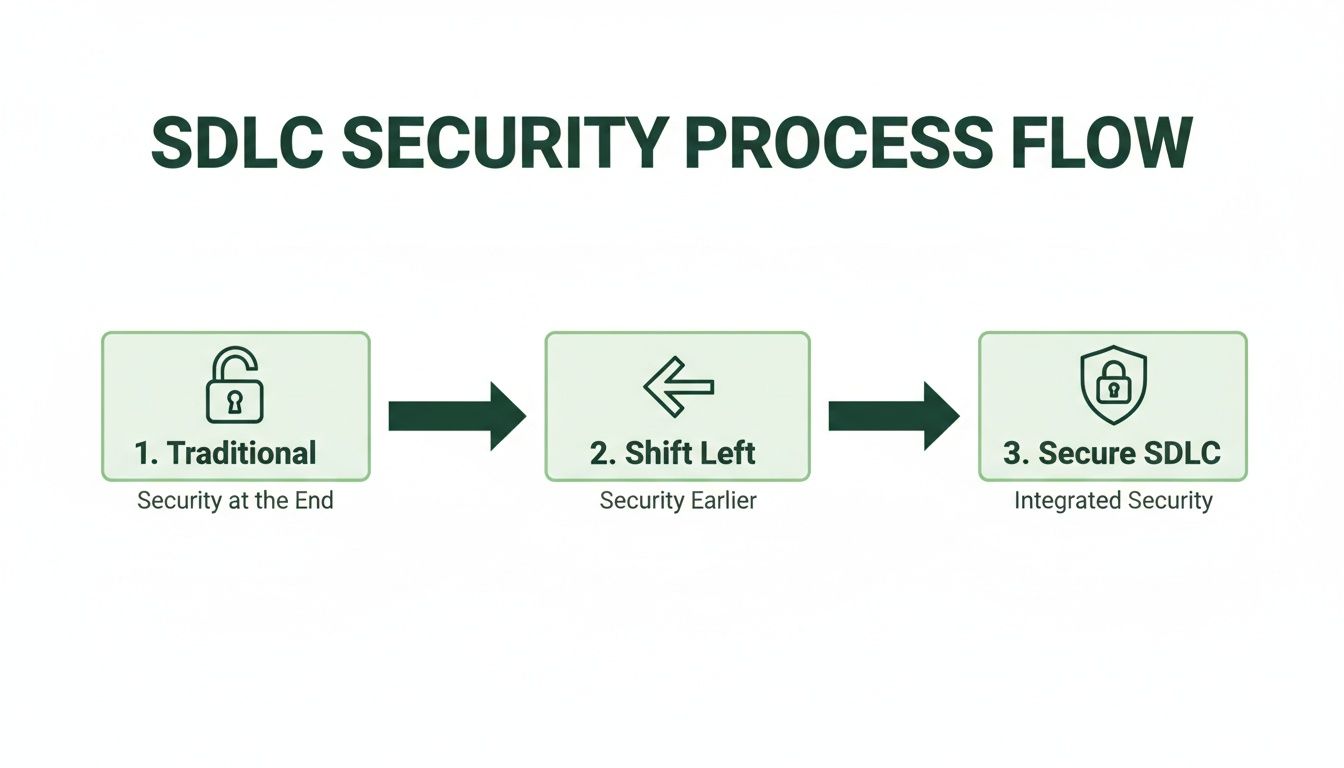
This really brings home the journey towards a mature security posture. You can see the shift from last-minute fixes to creating a culture where security is a foundational element from day one.
Requirements: The Blueprint for Security
Everything starts here. The requirements phase isn’t just about listing what the software should do; it’s just as much about defining what it must not do. This is your first, and arguably best, chance to lay down a strong security foundation.
It’s surprisingly easy to overlook threats at this stage. Teams might forget to define user roles properly, gloss over data handling policies, or ignore compliance needs. This creates a mountain of security debt before a single line of code is even written.
The fix is to embed specific security controls directly into your project requirements:
- Data Classification: Get crystal clear on what data is sensitive (think PII, financial details) and create strict rules for how it's handled.
- Access Control Policies: Define exactly who can access what, and under which conditions. This is the bedrock for implementing features like Row-Level Security (RLS) in Supabase.
- Compliance Needs: Figure out which regulations apply to you, like GDPR. These will dictate many of your security and privacy features.
Design: Architecting a Defensible System
In the design phase, you turn those requirements into an architectural blueprint. A flaw in the design can introduce vulnerabilities that are a nightmare to fix later on. It's like designing a building with secure entry points from the start, rather than trying to barricade the windows after it’s already built.
The biggest threat here is an insecure architecture. This could be anything from exposing sensitive database functions publicly, designing a weak authentication flow, or failing to properly isolate different parts of the system.
Threat modelling is your best friend during the design phase. It’s a structured brainstorming session where your team thinks like an attacker, mapping out potential threats, attack vectors, and vulnerabilities specific to your application. This helps you build defences before the bad guys find the weaknesses.
Your key controls here are all about proactive threat hunting. For instance, if you're building on Firebase, you need to plan your Firestore Security Rules meticulously to stop unauthorised data access. Likewise, for a Supabase project, designing robust RLS policies upfront is completely non-negotiable.
Implementation: Secure Coding in Practice
This is where the magic happens—and where a lot can go wrong. Developers turn the designs into real, working code, but it’s also where many common vulnerabilities creep in.
The threats are often old but persistent foes: SQL injection, cross-site scripting (XSS), and insecure direct object references. More recently, hardcoded secrets—like API keys or database credentials accidentally committed to source code—have become a massive headache, especially in fast-moving teams.
Secure coding standards are your primary defence. This means:
- Input Validation: Never, ever trust user input. Always sanitise and validate everything to fend off injection attacks.
- Dependency Management: Use tools to scan your open-source libraries for known vulnerabilities. A staggering 40% of breaches are now reported to originate from attacks on the software supply chain.
- Secrets Management: Use a proper vault for all your secrets, tokens, and credentials. They have absolutely no place in your codebase.
Testing: Finding Flaws Before Attackers Do
The testing phase is the official hunt for bugs and vulnerabilities. In the old days, this was often the first time anyone really thought about security. In a truly secure SDLC, testing is about validating the controls you’ve already built and catching anything that slipped through the cracks.
The common threats here are the undiscovered vulnerabilities that made it past development. These could be subtle logic flaws in your business processes, infrastructure misconfigurations, or sneaky coding errors.
A multi-layered testing strategy is the only way to go. This should include:
- Static Application Security Testing (SAST): Tools that scan your source code for potential weak spots.
- Dynamic Application Security Testing (DAST): Tools that test the running application to find security holes.
- Penetration Testing: A simulated real-world attack to see what can actually be exploited.
Deployment and Maintenance: The Long Game
Hitting 'deploy' isn't the finish line; it’s the starting gun. Your application is now live, and the maintenance phase is all about monitoring, patching, and responding to new threats as they emerge.
Once deployed, your biggest threat is the constantly shifting security landscape. New vulnerabilities are found every day, and system configurations can drift into insecure states without you noticing.
Continuous monitoring is absolutely vital. This means actively looking for suspicious activity, applying security patches the moment they're available, and regularly re-assessing your security posture. For anyone using BaaS platforms, this includes periodically auditing your RLS policies and cloud function permissions to make sure they're still watertight as your application grows and changes.
How to Actually "Shift Left" with Security
Shifting security left isn't about adding more bureaucratic hurdles for your developers. It's about weaving automated security checks right into the fabric of your development process. Think of these tools as a security-savvy co-pilot, flagging potential problems long before they have a chance to become a full-blown crisis in production. This isn't about slowing down; it's about building a robust safety net that lets your team code faster and with more confidence.
Let's use an analogy. In a traditional development cycle, security testing often happens at the very end. That's like a car manufacturer only performing a crash test after the first thousand cars have rolled off the assembly line. Shifting left is the equivalent of running simulations and safety checks on every single component as it’s being designed and built. This proactive approach is built on a few core automated testing techniques.
Catching Flaws Early with Static Application Security Testing (SAST)
Static Application Security Testing (SAST) is a cornerstone of any good shift-left strategy. At its heart, SAST is like a highly advanced spell-checker for your code. But instead of looking for typos, it hunts for security vulnerabilities directly within your source code, bytecode, or binaries—all before the application is even run.
Because SAST analyses your code "at rest," it catches issues right in the implementation phase. A developer can trigger a scan straight from their own IDE and get feedback almost instantly.
This early insight is a massive advantage. Imagine finding a critical SQL injection flaw just moments after you’ve written the problematic code, instead of weeks later during a formal penetration test. This tight feedback loop means developers can fix vulnerabilities while the logic is still fresh in their minds, turning a potential disaster into a minor, ten-minute fix.
SAST is your first line of automated defence. It helps enforce secure coding standards by catching common but dangerous programming errors like buffer overflows, injection flaws, and insecure API usage before they ever make it into a build.
Auditing Your Dependencies with Software Composition Analysis (SCA)
Let's be honest, modern applications are rarely built entirely from scratch. They're assembled from a vast ecosystem of open-source libraries and third-party dependencies. While this speeds up development dramatically, it also opens up a huge new front for risk. A single vulnerable library can become the weak link that brings down your entire application.
This is exactly what Software Composition Analysis (SCA) is designed to prevent. SCA tools automatically scan your project’s dependencies, building an inventory of every open-source component you're using. They then cross-reference this list against massive databases of known vulnerabilities. In essence, SCA is a continuous security audit for your software supply chain.
Why is this so critical? The use of open-source components has exploded, and attackers have definitely noticed. Attacks targeting the software supply chain have shot up dramatically. An SCA tool can alert you the moment a library you rely on has a newly disclosed vulnerability, giving you the chance to patch or replace it before it's ever exploited.
Stamping Out Hardcoded Secrets and Credentials
One of the most common—and devastating—security blunders is hardcoding secrets. This is when sensitive information like API keys, database passwords, or authentication tokens are embedded directly into the source code. The moment this code gets pushed to a repository (even a private one), those secrets are considered compromised.
Secrets scanning tools are built to stop this from happening. They automatically comb through your entire codebase, commit history, and configuration files, looking for patterns that match secret keys and other credentials.
For any team, these tools are non-negotiable, especially if you're using platforms like Supabase or Firebase. The service account keys and API tokens for these services grant immense power. Accidentally leaking one can give an attacker a direct line to your backend and all your user data. Integrating automated secrets scanning into your pre-commit hooks or CI pipeline is an essential guardrail.
Modern Checks for BaaS Platforms
When you're building on a Backend-as-a-Service (BaaS) platform, traditional security tools just don't cut it. They have a major blind spot: the business logic defined in your security rules, like Supabase's Row Level Security (RLS) policies or Firebase's Security Rules.
This is where specialised logic checks are vital. For instance:
- RLS Logic Checks: A misconfigured RLS policy can easily lead to a data leak. Tools like AuditYour.App can analyse your RLS policies for logical flaws that might allow a user to access data they shouldn't see.
- Exposed RPCs: They can also detect when database functions (Remote Procedure Calls) are left publicly exposed without proper access controls, creating a direct path for an attacker to manipulate your data.
By automating these more modern checks, you can be sure that the unique and powerful security models of BaaS platforms are implemented correctly and remain secure as your application evolves.
Automating Security in Your CI/CD Pipeline
The real magic of shifting security left happens when you stop running manual checks and start automating them. This is where DevSecOps truly comes alive, embedding security scans directly into your Continuous Integration and Continuous Deployment (CI/CD) pipelines. When you do this, security stops being an occasional, manual chore and becomes a standard, non-negotiable part of every single build and release.
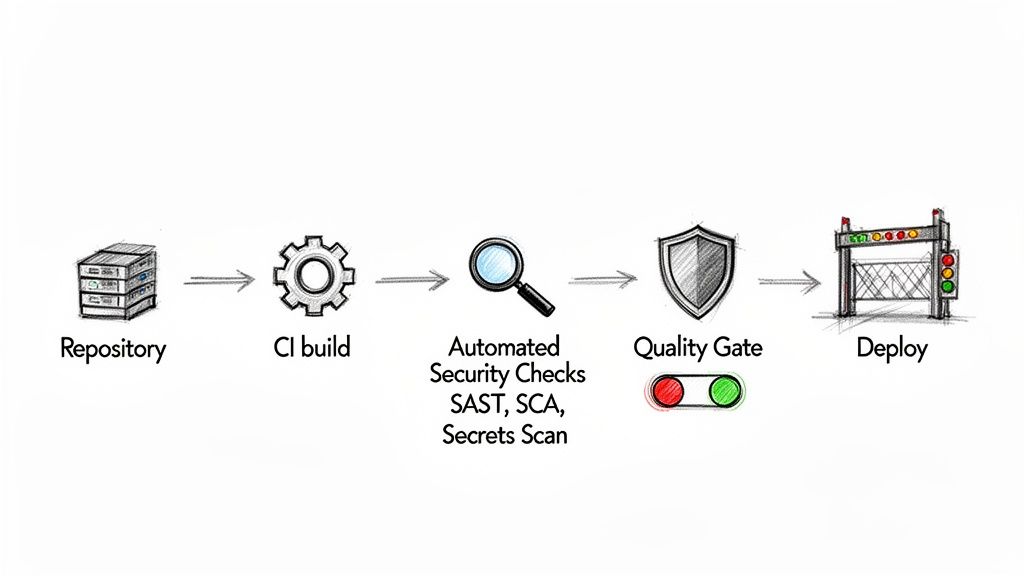
Think of your CI/CD pipeline as an automated assembly line for your software. Integrating security tools is like adding automated quality control stations along that line. If a component fails a check, the line pauses until the issue is fixed. This simple step prevents a faulty product from ever reaching the customer.
Establishing Security Quality Gates
The heart of this approach is the security quality gate. This is an automated checkpoint in your pipeline that automatically fails a build if it doesn’t meet predefined security standards. For instance, a quality gate might block a deployment if a SAST scan uncovers a high-severity vulnerability or if an SCA tool flags a dependency with a critical flaw.
These gates transform security from a subjective suggestion into a hard-and-fast rule. There's no negotiation, no corner-cutting, and no way to accidentally skip a crucial check. This approach is vital for maintaining a consistent security posture, especially in fast-paced agile environments where manual oversight just isn't practical.
In the UK, embedding strong security in the SDLC isn't just a best practice; it's an economic necessity. The nation's cybersecurity software development industry is approaching £1.4 billion in revenue. Yet, insecure development practices cause 82% of UK IT teams to face deployment delays that cost businesses an average of £107,000 each year. The NCSC’s guidelines on secure builds directly address this, promoting the very automation that turns these costly delays into confident, secure releases. You can find more data on the growth of the UK's cyber security software industry.
A Practical CI/CD Workflow Example
So, what does this look like in practice? Let's walk through a typical workflow using something like GitHub Actions, where each step is an automated job:
- On Commit/Pull Request: A developer pushes new code. This action immediately triggers the pipeline.
- SAST Scan: A tool scans the new code for vulnerabilities like SQL injection. Quality Gate: If it finds any high-severity issues, the build fails instantly, preventing the flawed code from being merged.
- Secrets Scan: The pipeline scours the commit for any hardcoded API keys or credentials. Quality Gate: If a secret is detected, the build fails, and the developer is alerted to remove it.
- SCA Scan: The tool analyses the project's dependencies for known vulnerabilities. Quality Gate: If a critical vulnerability is found in a library, the pipeline halts.
- Build & Test: Once all security checks pass, the application is built and the usual unit and integration tests run.
- Deploy to Staging: The build is deployed to a staging environment for further, real-world testing.
- Deploy to Production: After final approval, the secure, validated code is released.
By integrating these gates, you create a powerful feedback loop. Developers are notified of security issues within minutes of pushing their code, enabling them to fix problems while the context is still fresh in their minds.
Ensuring a Continuous Security Posture
While pipeline checks are brilliant for securing new changes, what about the security of your entire application over time? This is where continuous monitoring becomes critical.
Tools like AuditYour.App's Continuous Guard extend security beyond just the pipeline. They provide ongoing, automated scans of your live or staging environments, making sure your security posture doesn't degrade between deployments. This process constantly checks for issues like RLS policy drift, newly exposed database functions, or misconfigurations that might happen outside of a code change. For a deeper look, check out our guide on implementing automated security scanning. This turns security into a persistent, hands-off process that busy, agile teams can truly depend on.
Finding and Fixing Real-World Vulnerabilities
All the theory in the world doesn't mean much until you put it into practice. This is where real security improvements happen. It’s often the simple oversights, the things we miss when we’re focused on shipping features, that lead to the most significant breaches. We need to move from abstract concepts to a hands-on process for finding and fixing common flaws, especially on modern platforms like Supabase and Firebase where one misconfiguration can have immediate and disastrous consequences.
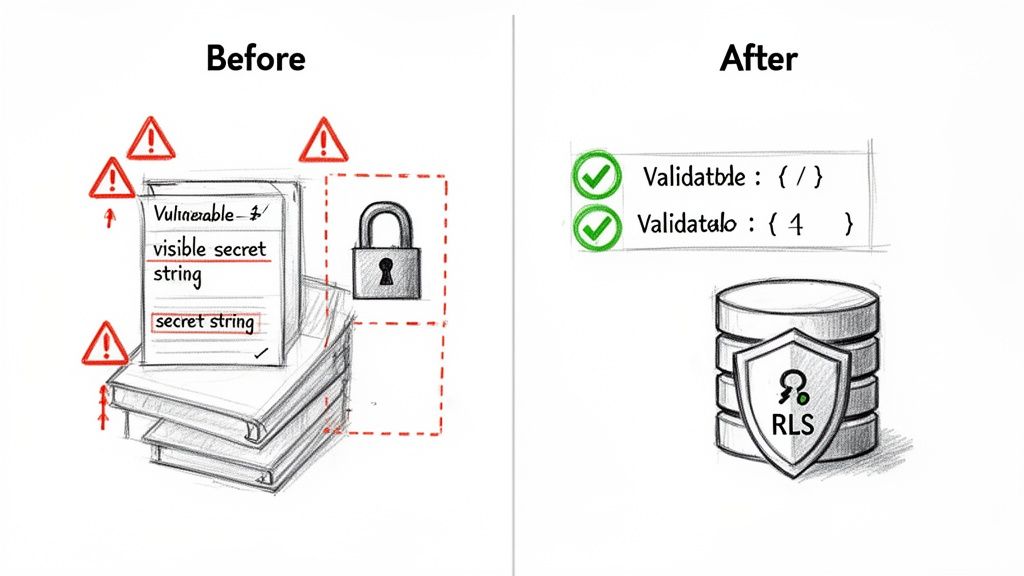
The good news is this process doesn't have to be a slow, manual slog. With the right automated tools, what might have been a week-long security audit can shrink to a task that takes just a few minutes. This empowers developers to find and fix issues with confidence, rather than fear.
From Theory to Actionable Fixes
The true value of a secure SDLC is a tight, rapid feedback loop. It's about developers being able to quickly spot a vulnerability, understand its impact, and patch it up. This is absolutely critical for the unique challenges of BaaS platforms—think flawed Row-Level Security (RLS) rules, exposed database functions (RPCs), or secrets accidentally hardcoded into your frontend code.
These aren't just theoretical risks; they are active threats waiting to be exploited. A single misconfigured RLS policy could easily expose every single user's private data. That's why automated, platform-aware scanning is no longer a 'nice-to-have' for teams building on these modern stacks. It’s your safety net, catching subtle but critical mistakes before anyone else does.
The cost of getting this wrong is steep. Delays in software projects cost UK enterprises an average of £107,000 each year. A staggering 82% of IT teams report these setbacks are often caused by last-minute security fire drills. This is precisely what the NCSC's guidelines on secure design aim to prevent, and automation is the key to turning those costly delays into rapid, confident releases.
A Practical Walkthrough with AuditYour.App
Let’s get our hands dirty and see how this works in a real-world scenario. Imagine you have a Supabase project and need to check its security posture. Instead of a complex, manual review, you can use a tool like AuditYour.App to get an instant baseline.
-
Run the Scan: You just provide your project's URL. The tool kicks off a deep analysis without needing any credentials or access to your code. It probes for common misconfigurations like publicly exposed tables, leaky RLS policies, and unprotected RPCs.
-
Interpret the Results: In minutes, you get a detailed security report. But this isn't just a list of potential problems; it provides concrete proof.
The report will clearly identify something like a critical RLS misconfiguration. It doesn’t just tell you what is wrong, but also why it's a severe risk, often demonstrating exactly how an attacker could leak sensitive data.
-
Fix and Validate: This is the most important step. A good tool won't just leave you to figure it out. Instead, it provides actionable, copy-and-paste SQL code snippets to fix the exact vulnerability it found. You can apply the fix directly to your database.
The magic is what comes next. You can re-scan your project instantly, validating that the fix has been applied correctly and the vulnerability is well and truly closed. This simple loop can take your security posture from a failing grade to an 'A' in a matter of minutes.
For mobile applications, the process is similar but focuses on other critical areas. If you're building an iOS or Android app, hardcoded secrets are a huge concern. You can learn more about how to start securing API keys in mobile apps to protect your backend services. By integrating these kinds of automated checks, you build a robust and repeatable process for security in the SDLC.
Actionable Checklist for Supabase and Firebase Security
To help your team get started, here's a practical checklist. Use it to quickly audit the most common weak points in your BaaS setup and take immediate action.
| Check Area | What to Look For | Recommended Action or Tool |
| ----------------------- | ---------------------------------------------------------------------------------- | -------------------------------------------------------------------------------------------------------------------------------------- |
| Row-Level Security | Tables without RLS enabled, overly permissive SELECT or INSERT policies. | Ensure RLS is enabled on all tables with sensitive data. Use auth.uid() in policies. Scan with AuditYour.App to find leaks. |
| Hardcoded Secrets | API keys, service role keys, or JWT secrets visible in your client-side code (JS/Dart). | Store secrets in environment variables on the backend. Never expose them client-side. Use a secrets scanner as part of your CI pipeline. |
| Exposed RPCs | Database functions (RPC) that can be called by anonymous or unauthorised users. | Set RPCs to SECURITY DEFINER and apply strict permissions. Test endpoints for authorisation flaws. |
| Third-Party Logins | Misconfigured OAuth providers or redirect URLs that could be hijacked. | Double-check your OAuth provider settings in the Supabase/Firebase dashboard. Use strict URL matching for redirects. |
| Anonymous Access | Tables or storage buckets that allow public read/write access without good reason. | Review permissions for anonymous and authenticated roles. Default to denying access and grant it explicitly where needed. |
This checklist isn't exhaustive, but it covers the high-impact areas where developers often make mistakes. Regularly running through these checks can dramatically improve your application's security posture.
Charting Your Course to Secure Applications
Building truly secure software isn't about ticking boxes on a checklist right before launch. It's about a fundamental shift in culture. When you embrace security in the SDLC, you stop treating security as an afterthought and start weaving it into the very fabric of your development process. It changes the conversation from "who broke this?" to "how can we build this securely from the start?"
This isn't just about avoiding a data breach, though that's a huge part of it. When you find and fix security weaknesses early, you're not just lowering risk; you're also saving yourself a mountain of time and money that would otherwise be spent on frantic, late-stage repairs. It leads to smoother release cycles, a stronger product, and most importantly, it builds trust with your users.
Take That First Step
The hardest part of any journey is getting started. Don't fall into the trap of waiting for the perfect, all-encompassing security plan. The most effective first move is to simply understand where you stand right now. Run an assessment on your current projects—it gives you an instant, real-world baseline to build upon.
For developers and startups, especially those working with platforms like Supabase or Firebase, this first look has to be quick and straightforward. You need actionable insights without the friction and cost of a traditional security audit. This is where modern, developer-focused tools really shine.
The aim isn't to achieve flawless security overnight. It's about making a tangible improvement today. A single scan can uncover critical risks you can fix in a matter of minutes, which is a massive leap forward.
This is exactly what platforms like AuditYour.App were built for. You can get an immediate security baseline with a Single Snapshot scan, giving you a clear view of your vulnerabilities with zero complicated setup. As you mature, you can move to Continuous Guard to automate these checks, making security a natural part of your daily workflow. For a more detailed guide on what to prioritise, check out our pre-launch security checklist.
Your journey towards building more secure applications starts with one simple action: taking an honest look at where you are today. Why not start now?
Your Questions About SDLC Security, Answered
Jumping into DevSecOps often brings up a lot of practical questions, especially for teams trying to figure out how to bake security into their daily work without slowing everything down. Let's tackle some of the most common ones to give you clear, straightforward answers for securing your software development lifecycle.
What's the Best First Step to Improve Our Security?
The best way to start is to pick one small thing that makes a big difference. Don't try to boil the ocean and fix everything at once. Go for a quick win that gives you immediate value.
A great place to begin is by adding a single, automated security check into your process. For instance, plugging a secrets scanner into your CI/CD pipeline is a simple move that immediately stops credentials from ever leaking into your codebase. It’s a powerful safety net that’s easy to set up.
Once you have that in place, run a full baseline audit on your most important application. This gives you a clear, honest snapshot of where you stand and a data-backed list of what to prioritise next.
How Can a Small Team Do DevSecOps Without a Security Expert?
You absolutely don't need a dedicated security engineer on staff to start building secure software. The secret is to use modern, developer-friendly security tools that do the heavy lifting for you.
The best security tools for smaller teams feel like a natural part of the development day, not another frustrating roadblock. They need to give you clear advice that any developer can understand and act on right away.
This is exactly why platforms like AuditYour.App exist. They’re designed to automate complex security checks, turn the findings into simple, step-by-step fix instructions, and slot right into your existing workflow. This approach empowers your developers to own security without needing a PhD in cryptography.
Is Shifting Left an Expensive Thing to Do?
It’s easy to see the upfront cost of tools and training and think shifting left is expensive, but that's looking at it the wrong way. In reality, it’s one of the smartest cost-saving moves you can make. The long-term return is massive.
Just think about the numbers:
- Prevention vs. Cure: Fixing a security bug while you're still writing the code is massively cheaper than trying to patch it after it’s live and in the hands of users. We're talking orders of magnitude cheaper.
- The Cost of a Breach: The financial fallout and brand damage from a single data breach can be devastating. It can easily dwarf any investment you’d make in security tooling.
- Developer Time Is Money: Catching issues early saves your team from weeks of frantic, late-night emergency fixes. That’s time they can spend building new features that actually make you money.
When you look at it that way, investing in early, automated security isn't a cost—it's a much cheaper alternative to paying the price for insecure code down the line.
Ready to get an instant, clear picture of your application's security posture? AuditYour.App offers a frictionless way to find and fix critical misconfigurations in your Supabase, Firebase, and mobile apps. Run your first free scan and go from a failing grade to an 'A' in minutes. Start your journey to a more secure SDLC today at https://audityour.app.
Scan your app for this vulnerability
AuditYourApp automatically detects security misconfigurations in Supabase and Firebase projects. Get actionable remediation in minutes.
Run Free Scan