Cloud security services are the tools and practices that keep your data, apps, and infrastructure safe when they live in the cloud. Think of it less as a product and more as your dedicated security team for everything digital, guarding access, encrypting data, and watching over your network.
Why Cloud Security Services Are Not Optional
Let’s skip the dry, textbook definitions and get straight to what matters. Imagine your cloud environment is a brand-new, high-tech apartment building. Your cloud provider—someone like AWS or Google Cloud—is responsible for securing the building itself. They’ve built strong foundations, installed security cameras at the main entrance, and put up a solid perimeter fence. This is what we call security of the cloud.
But here’s the catch: you are still the only one responsible for locking your own apartment door. That means securing your applications, protecting your sensitive data, and deciding who gets a key (managing user access). This critical split in duties is known as the shared responsibility model, and it’s the cornerstone of cloud security.
This shared responsibility means that while your provider gives you a secure platform, the security of what you build on that platform is entirely up to you. A simple misconfiguration in your app is your problem, not theirs.
This distinction is even more important when you’re using modern Backend-as-a-Service (BaaS) platforms like Supabase and Firebase. These tools are built for speed, which is great for developers but can accidentally create unique and subtle security holes that old-school security tools just don't see.
The Accelerating Need for Specialised Security
Cloud adoption is moving at a breakneck pace, and frankly, most organisations are struggling to keep their security practices up to speed. For example, the UK cloud computing market is expected to rocket from £64.97 billion in 2026 to £135.64 billion by 2031.
Despite this growth, a worrying 43% of firms reported a cloud-related breach in 2024, which is fuelling huge demand for specialised cloud security services. Discover more insights about UK cloud market trends on mordorintelligence.com.
This widening gap reveals a crucial truth: you can't just rely on your provider's infrastructure security anymore. You need tools that actually understand the unique architecture of your applications and how they work.
To make the shared responsibility model crystal clear, let's break down who handles what.
The Cloud Shared Responsibility Model Explained
Here’s a simple table that cuts through the jargon and shows where your cloud provider’s job ends and yours begins.
| Security Area | Cloud Provider Responsibility | Your Application Responsibility | | :--- | :--- | :--- | | Physical Security | Securing the actual data centres, servers, and network hardware. | Nothing. This is all on them. | | Infrastructure | Managing the core computing, storage, and networking services. | Configuring your own virtual network, subnets, and firewalls correctly. | | Data & Access | Providing the tools for encryption and identity management. | Actually using those tools. This means encrypting your data, managing user permissions, and setting up strict access policies (like RLS). | | Application Logic | Ensuring the platform services they offer are inherently secure. | Writing secure code and making sure your app isn't riddled with misconfigurations. |
So, what does this all mean for you?
In the end, cloud security services are your specialised toolkit for upholding your side of this agreement. They aren’t just a nice-to-have; they’re an absolute must for building strong, trustworthy applications in a world that never slows down.
The Five Pillars of Modern Application Security
To build a solid defence for your cloud applications, you need a proper framework. Just reacting to threats as they pop up isn't a strategy; it’s a gamble. A truly robust approach to cloud security services means breaking down your defences into five distinct, yet interconnected, pillars.
Think of this framework as the architectural blueprint for your app's security. Each pillar supports the others, and if one is weak, the whole structure can become unstable. This model helps shift your thinking from chaotic and reactive to clear and proactive, giving you a mental map to build a comprehensive and resilient security posture.
A big part of this is understanding the shared responsibility model. You and your cloud provider are partners in security. This infographic breaks down that relationship, showing where their job ends and yours begins.
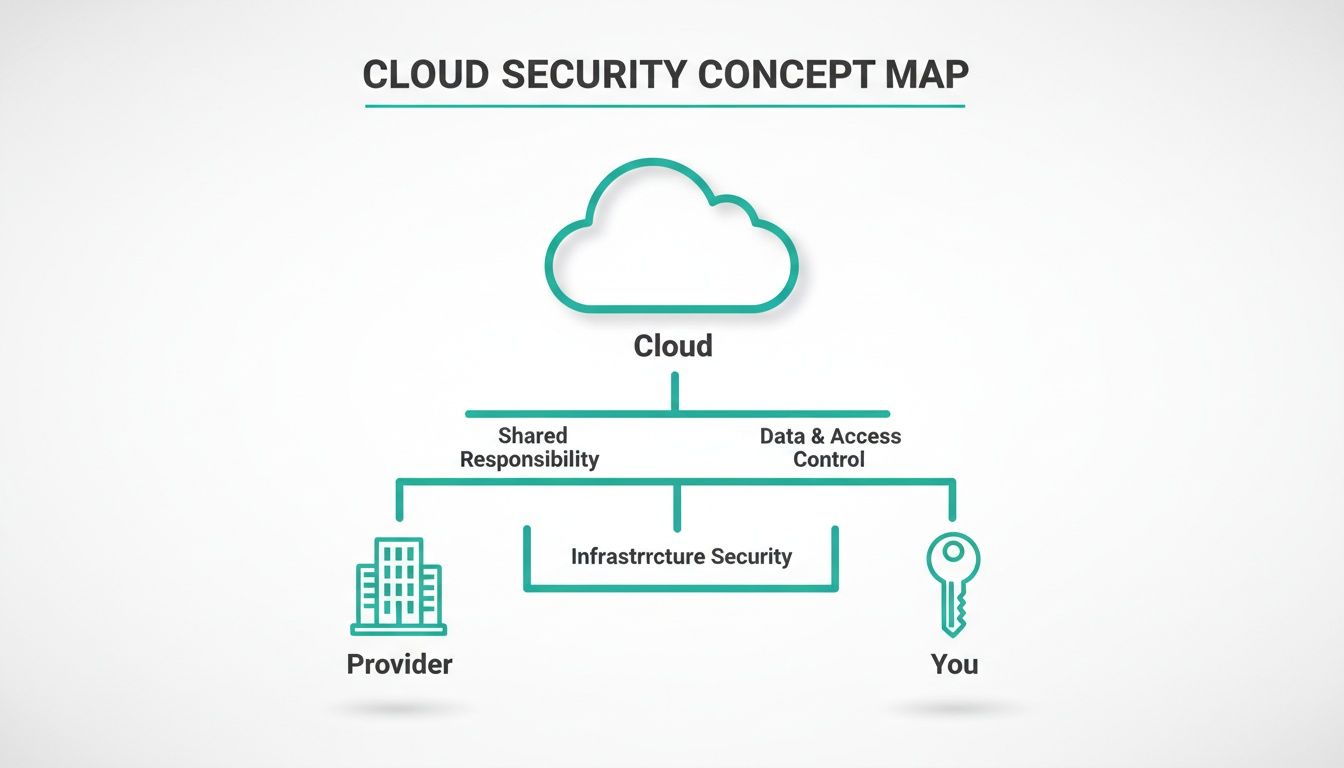
As you can see, the cloud provider secures the underlying infrastructure—the physical data centres, the servers, the core network. But you are responsible for everything you build on top of it: your application, your data, and who gets to access it.
Pillar 1: Identity and Access Management
Identity and Access Management (IAM) is essentially the high-tech keycard system for your digital world. Its entire job is to answer one simple question: "Who are you, and what are you allowed to do here?" IAM is all about making sure only the right people and services get access to specific resources.
This goes way beyond just a username and password. Modern IAM relies on things like multi-factor authentication (MFA), role-based access control (RBAC), and enforcing the principle of least privilege. This is a crucial concept: it means a user or service only gets access to the absolute minimum data and functions needed to do their job, and not a single thing more.
Pillar 2: Data Protection
If IAM is the keycard system, then Data Protection is the reinforced, fireproof safe where you keep your most valuable assets. This pillar is focused on protecting your data, whether it's just sitting in a database (data at rest) or zipping across the internet (data in transit).
The main tool for this job is encryption. By encrypting data, you're scrambling it into a completely unreadable format that can only be unlocked with a specific key. This ensures that even if an attacker manages to get past your other defences and snatch your data, it's totally useless to them. Good data protection isn't just a nice-to-have; it's non-negotiable for building customer trust and meeting compliance rules.
Pillar 3: Network Security
Think of Network Security as the digital perimeter fence, complete with a security guard at the gate. It's all about controlling the traffic that flows in and out of your cloud environment, creating a secure boundary between your trusted internal network and the wild, untrusted internet.
Key tools in your network security arsenal include:
- Firewalls that act as filters, blocking or allowing traffic based on a set of security rules.
- Virtual Private Clouds (VPCs) that create isolated, private pockets of the cloud for your resources to live in.
- Security Groups, which are like personal firewalls for your individual servers and databases, controlling exactly what connections they can make or receive.
This pillar is your first line of defence, designed to stop malicious requests at the front gate before they can even get close to your application.
Pillar 4: Cloud Security Posture Management
Imagine you hired a 24/7 security patrol that constantly walks around your digital property, checking for unlocked doors, open windows, or any other potential weaknesses. That's exactly what Cloud Security Posture Management (CSPM) does.
CSPM tools continuously scan your cloud infrastructure for misconfigurations, compliance violations, and security risks. They automate the process of finding weaknesses before an attacker can exploit them.
These services give you a single dashboard to see your entire security health at a glance. They'll flag dangerous issues like public storage buckets or access policies that are far too permissive. For anyone whose cloud environment is growing or changing, CSPM is essential for keeping an eye on everything.
Pillar 5: Threat Detection and Response
Finally, we have Threat Detection and Response. This is your high-tech alarm system, wired directly to an emergency response team. This pillar operates on the assumption that a breach isn't a matter of "if" but "when," and it’s all about spotting and reacting to incidents as they happen.
It involves monitoring logs, network traffic, and system behaviour for anything that looks out of the ordinary. When a potential threat is spotted—like a login from a strange location or unusual data access patterns—the system fires off an alert. The "response" part is about having a clear plan to investigate the incident, contain the damage, and get back to normal as quickly as possible. This kind of proactive monitoring is a critical final layer in any modern cloud security strategy.
Common (and Critical) Misconfigurations in Supabase and Firebase
Modern platforms like Supabase and Firebase are fantastic. They let small teams and even solo developers build incredibly powerful applications at a speed that was once unthinkable. But that speed comes with a trade-off. It’s all too easy to leave a door unlocked while you’re busy building the rest of the house.
These aren't some obscure, zero-day exploits we're talking about. These are the common, everyday configuration mistakes that attackers actively look for and exploit. This is where the rubber meets the road for cloud security services—moving from abstract concepts to the practical, nitty-gritty details that keep your app and your users safe.
Let’s pull back the curtain on three of the most frequent and dangerous misconfigurations we see in the wild.
The Danger of Permissive Row-Level Security
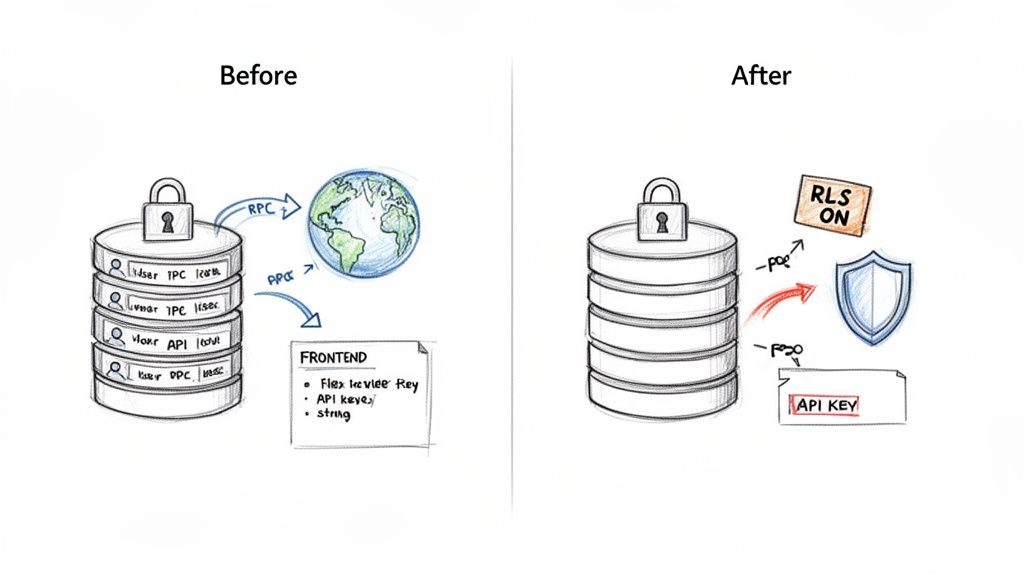
Row-Level Security, or RLS, is arguably the most critical security feature in Supabase. Think of it as a bouncer for your database tables. It checks the ID of every user trying to access data and only lets them see the specific rows they're supposed to. When it’s set up correctly, it’s brilliant.
The problem is, developers often disable it during early development and forget to turn it back on, or they set up a policy that’s far too trusting. A classic mistake is a rule that says, "let any authenticated user read from the profiles table."
Without strict, granular RLS policies, your database is effectively an open book. A single oversight can accidentally expose your entire user database, making sensitive information like emails, names, and personal details available to anyone with a valid login.
Here’s what a dangerously broad policy looks like in practice:
-- BEFORE: Insecure RLS Policy
CREATE POLICY "Allow all authenticated users to read profiles"
ON public.profiles FOR SELECT
TO authenticated
USING (true);
That USING (true) part is the killer. It means the condition is always met for anyone who’s logged in. A bad actor could sign up for a free account, log in, and then write a simple script to dump every user's personal information.
Fixing this is about enforcing the principle of least privilege—users should only access what is strictly theirs.
-- AFTER: Secure RLS Policy
CREATE POLICY "Users can only view their own profile"
ON public.profiles FOR SELECT
TO authenticated
USING (auth.uid() = id);
This is the fix. The policy now explicitly checks if the logged-in user's ID (auth.uid()) matches the id of the row they're trying to view. It's a small code change, but it’s the difference between a locked-down system and a catastrophic data breach. For more actionable advice, check out our complete guide on essential cloud security tips.
Unprotected Remote Procedure Calls
Remote Procedure Calls (RPCs), or database functions, are a clean way to handle complex logic. Instead of your app making five different database calls to create an invoice, it can just call one function, create_invoice, and let the database do the heavy lifting. It keeps your client-side code tidy.
But here’s the catch: by default, any RPC you create in Supabase can be called by anyone who has your public API key. And that key is right there in your app’s JavaScript, for all to see.
This turns your internal business logic into an unsecured public API. Imagine an attacker finding a function named delete_user_account(user_id) or, even worse, update_user_role(user_id, 'admin'). They could cause absolute chaos.
The solution is to build your security checks directly into the functions. You can do this by running the function with SECURITY DEFINER (giving it elevated rights) but then adding strict authorisation checks inside the function to ensure the person calling it is allowed to perform that action.
Take a look at this ticking time bomb of a function: -- BEFORE: Unsecured Public RPC CREATE FUNCTION delete_user(user_id uuid) RETURNS void AS $$ BEGIN DELETE FROM auth.users WHERE id = user_id; END; $$ LANGUAGE plpgsql; Anyone with your public key could call this and start deleting users one by one. Now, let’s see the secure version.
-- AFTER: Secured RPC with Role Check
CREATE FUNCTION delete_own_account()
RETURNS void AS $$
BEGIN
DELETE FROM auth.users WHERE id = auth.uid();
END;
$$ LANGUAGE plpgsql SECURITY DEFINER;
This is so much better. It doesn't take a user_id as an input; instead, it securely gets the caller’s ID from auth.uid(). It can only ever delete the account of the person making the request. This turns a massive vulnerability into a safe, standard user feature.
Leaked API Keys and Service Secrets
This last one is the most straightforward but happens with alarming frequency: developers leaking high-privilege keys in their client-side code. Every BaaS project has two types of keys: public ones (like the anon key) meant for your frontend, and private ones (like the service_role key) that must remain secret.
The service_role key is the master key to your kingdom. It bypasses all RLS policies and can do absolutely anything to your data. If an attacker gets their hands on it, it's game over.
This often happens when someone is in a rush. They need to perform a quick admin task from the app, so they hardcode the service key into the mobile app's source code or a web app's JavaScript bundle. Once that code is out in the wild, it's trivial for an attacker to decompile the app or inspect network traffic to find the key.
The UK's cyber security sector is booming for a reason, reaching a gross value added of £7.8 billion in 2025—a 21% annual increase. This growth is fuelled by the urgent need for specialised cloud security services to prevent precisely these kinds of simple, yet devastating, mistakes.
Protecting your secrets is non-negotiable and requires discipline:
- Never put
service_rolekeys or any other secrets in your frontend or mobile app code. Full stop. - Store all secrets securely in environment variables on a backend server you control.
- When you need to perform privileged actions, use a secure intermediary like a serverless function (e.g., Supabase Edge Functions). The function holds the secret, and your app calls the function.
Treat your secret keys like radioactive material. They should never, ever touch the client side.
Common BaaS Vulnerabilities at a Glance
To bring this all together, it helps to see these common issues laid out side-by-side. The table below is a quick-reference guide to the vulnerabilities we've discussed, what they really mean for your business, and how to shut them down for good.
| Vulnerability | The Risk Explained | Potential Business Impact | Effective Remediation |
| :--- | :--- | :--- | :--- |
| Permissive RLS | Database rules are too broad, allowing users to see or modify data that isn't theirs. | Massive data breach, loss of user trust, compliance fines (e.g., GDPR). | Implement strict RLS policies that limit access to a user's own data (auth.uid() = user_id). |
| Public RPCs | Backend database functions are exposed without any authorisation checks, acting as unsecured APIs. | Unauthorised data deletion/modification, privilege escalation, service disruption. | Build security checks into RPCs. Use auth.uid() to identify the caller and verify their permissions. |
| Leaked Service Keys | The master service_role key is embedded in client-side code (web or mobile app). | Complete database compromise. Attacker gains full admin access to read, write, and delete all data. | Never embed secrets in client code. Store them in backend environment variables and use serverless functions as a proxy. |
While these platforms make development easier, they don't remove the fundamental need for security diligence. By understanding and actively preventing these common pitfalls, you can build quickly without sacrificing the safety of your application or your users' data.
Choosing the Right Cloud Security Partner
Picking a partner to handle your cloud security is a massive decision. Think of it like hiring an architect to fortify a modern skyscraper. You wouldn't bring in an expert on medieval castles, would you? The core principles might overlap, but the tools, threats, and materials are worlds apart. It’s the same with security scanners. Not all are built with the same blueprint, and a generic tool can easily bury your team in irrelevant alerts while completely missing the subtle, stack-specific risks that actually matter.
The wrong choice inevitably leads to alert fatigue, wasted engineering hours, and a dangerous false sense of security. The right partner, on the other hand, becomes a true extension of your team. They deliver sharp, actionable intelligence that genuinely improves your security posture without grinding your development team to a halt. The trick is to look past the flashy dashboards and start asking the tough questions that reveal a tool's real value.
This decision is especially critical right now. In 2024, the UK cloud security market hit a valuation of USD 2.6 billion, a figure fuelled by a huge spike in cyber threats that have now affected a staggering 87% of UK organisations. With the sector forecast to swell to USD 7.1 billion by 2033, the number of security services on offer will only grow, making a clear evaluation plan more crucial than ever. You can explore more data on the UK cloud security market to get a better sense of these trends.
Stack Specialisation and Deep Analysis
The first, and frankly most important, question you need to ask is: does this tool really understand my tech stack? A generic vulnerability scanner might be good at checking for outdated libraries or open ports, but it will almost certainly miss the nuanced misconfigurations specific to platforms like Supabase and Firebase. A specialised tool, however, knows exactly where to look.
It’s designed to answer critical questions such as:
- Is my Row-Level Security (RLS) policy too permissive? It won't just confirm that RLS is switched on; it will actually analyse the SQL logic to see if it properly protects user data.
- Are my database functions (RPCs) exposed? It will pinpoint which functions are publicly callable and check whether they have the right authorisation in place.
- Have I leaked any secrets? It will scan your frontend code and mobile app bundles for hardcoded API keys, especially the ultra-sensitive
service_rolekey.
A truly effective security partner doesn't just skim the surface. It performs deep, dynamic analysis of your application logic, basically simulating how a real attacker would probe your system to find a way in.
Automation and CI/CD Integration
Security should never be a roadblock that stops development in its tracks. It needs to be an automated guardrail that keeps everything on a safe path. Any modern security partner must fit seamlessly into your development workflow. If a tool demands manual scans, a complicated setup, or constant hand-holding, a fast-moving team will simply abandon it.
Look for a service that integrates tightly with your Continuous Integration/Continuous Deployment (CI/CD) pipeline, like GitHub Actions. The ideal tool will automatically scan every single pull request, catching vulnerabilities long before they ever get a sniff of your production environment. This "shift-left" approach makes security a natural, frictionless part of the development cycle. You can learn more by comparing the features of free vs. paid security tools and how they handle integration.
Actionable Intelligence, Not Just Alerts
At the end of the day, a security scan is only as useful as the actions it inspires. A long list of cryptic warnings with no context or guidance is worse than useless—it’s counterproductive. It just creates more work, not solutions.
A top-tier cloud security partner provides actionable intelligence. What does that mean? For every single vulnerability it finds, it must also provide:
- Clear Context: An explanation of why the issue is a risk and the potential impact on your business.
- Precise Location: The exact line of code or configuration setting that needs fixing.
- Actionable Fixes: Concrete advice on how to fix it, like a corrected SQL snippet for an RLS policy or a secure code pattern for an RPC.
This approach empowers your developers to fix issues quickly and confidently. It transforms a security scan from a stressful audit into a valuable learning opportunity. By prioritising specialisation, automation, and genuinely actionable fixes, you can choose a partner that doesn't just find problems but actively helps you build a more secure and resilient application.
Weaving Security into Your Development Workflow
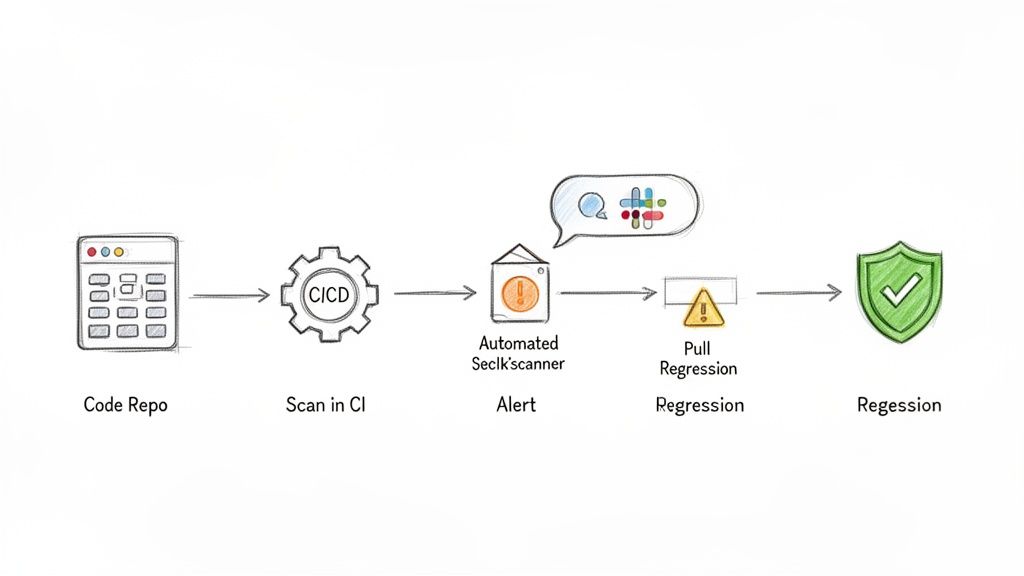
Real cloud security isn't about a frantic, last-minute audit or a simple checkbox ticked just before you go live. It’s something you build into the very fabric of your development process, making it a natural part of how your team works, not a stressful roadblock.
This philosophy is often called "shifting security left," which is just a practical way of saying you should check for problems much earlier. Instead of discovering a critical vulnerability hours before a big launch, you can catch it moments after the flawed code is even written. This transforms security from a dreaded, periodic event into a quiet, automated process that runs in the background, giving your team the confidence to build and ship features quickly.
By weaving cloud security services directly into your day-to-day workflow, you create a powerful feedback loop that helps everyone learn and prevents the same mistakes from cropping up again.
Integrate Automated Security Scans into Your CI/CD Pipeline
The heart of any modern development team is its Continuous Integration and Continuous Deployment (CI/CD) pipeline. Think of it as the automated assembly line that takes code from a developer’s computer and delivers it to your users. It's the perfect place to install your security guard.
By integrating automated scans right into this pipeline, you guarantee that every single code change gets a security review. This is often done using tools like GitHub Actions, which can be set up to trigger a security scan on every single pull request. Before any new code can be merged, it’s automatically checked for common misconfigurations, like leaky RLS policies or accidentally exposed database functions.
This small step ensures security isn't an afterthought but a mandatory checkpoint that every single code change must pass through.
Set Up Smart Alerting and Regression Tracking
Automation is great, but without smart communication, it just creates noise. If your team is bombarded with an endless stream of low-priority alerts, they’ll quickly start tuning them out. That's why a critical piece of the puzzle is setting up an intelligent alerting system.
The best alerting systems deliver high-signal, low-noise notifications directly to the right people. Instead of spamming a general channel, alerts should be routed straight to the developer who committed the problematic code, ideally through a tool they already use every day, like Slack or email.
This creates a clear line of ownership and makes fixes happen much faster. But the job isn't done once a vulnerability is fixed.
This is where regression tracking comes in. A good security service has a long memory. It remembers every vulnerability it has ever found. If an issue you've already fixed somehow reappears in a future update, the system should immediately flag it as a regression. This simple feature is what makes sure that when you patch a security hole, it stays patched. You can learn more about how this fits into the bigger picture by reading our guide on security in the SDLC.
By focusing on these three steps, you can build a truly resilient development workflow:
- Automate Scans: Plug security checks directly into your CI/CD pipeline to vet every pull request.
- Smart Alerts: Send clear, actionable notifications to the right team members to get issues fixed fast.
- Track Regressions: Use a system that stops old vulnerabilities from accidentally being reintroduced.
This approach makes security a shared, manageable responsibility that actually helps your team move faster, not slower.
Shifting from Reactive Fixes to a Proactive Security Mindset
We’ve covered a lot of ground, from the core principles of cloud security services to the nitty-gritty of common misconfigurations and automated scanning. If there’s one thing to take away, it’s this: in modern development, you can no longer afford to treat security as an afterthought. Waiting for something to break before you fix it is a recipe for disaster.
The best cloud security services are the ones that blend right into the tools your team already uses. When you weave continuous security scanning directly into your workflow—from the moment a developer writes their first line of code to the final push to production—you start to build a much healthier engineering culture. Security stops being a last-minute, stressful audit and becomes a shared responsibility that actually helps you move faster.
A proactive security culture doesn't slow developers down; it gives them the confidence to build and ship features faster, knowing that automated guardrails are in place to catch critical mistakes.
This is how you build apps that people love, trust, and rely on. It’s about making security a fundamental part of your product’s DNA, ensuring that what you create is not just innovative, but built on a foundation of safety. To take the next step in securing your applications, check out the resources at AuditYour.App.
Got Questions About Cloud Security? We've Got Answers.
Let's clear up a few common questions we hear from teams getting to grips with cloud security, especially when working with modern stacks like Supabase and Firebase.
Can't I Just Rely on My Cloud Provider for Security?
This is a huge, yet common, misunderstanding. The short answer is no. Cloud giants like AWS and Google Cloud operate on what's called a shared responsibility model.
Think of it like this: they’re responsible for the security of the cloud—the physical data centres, the servers, the global network. But you are always responsible for security in the cloud. That means securing your own application, your data, and how you grant access to it.
For platforms like Supabase or Firebase, this boils down to your own configurations. They provide powerful tools like Row Level Security and API key management, but it's entirely on you to use them correctly.
How Often Should We Be Running Security Scans?
For any team shipping code regularly, security scanning needs to be a constant, automated part of your workflow. The old way of doing a big, scary security audit once a year just doesn't cut it anymore.
The best practice today is to build automated scans directly into your CI/CD pipeline. This means every single time a developer pushes new code, it gets checked for potential vulnerabilities before it even has a chance to make it to production.
This is what people mean by 'shifting left'—catching security issues early in the development process. It turns security from a periodic headache into a routine, manageable part of building great software.
Is Cloud Security Too Expensive for a Startup or Small Team?
Not at all. While the price tags on some enterprise-level security suites can be eye-watering, a new generation of tools is built specifically for startups and smaller dev teams. Many offer flexible pricing models that scale with you.
Honestly, the real question is whether you can afford not to invest in it. The cost of a proactive security tool is a drop in the ocean compared to the financial and reputational fallout from a single data breach. It's one of the highest-return investments you can make.
Ready to move from reacting to problems to proactively preventing them? AuditYour.App offers specialised, automated security scanning built for Supabase and Firebase. Get your first scan in minutes and see exactly what you need to fix with clear, developer-first advice. Secure Your App Today.
Scan your app for this vulnerability
AuditYourApp automatically detects security misconfigurations in Supabase and Firebase projects. Get actionable remediation in minutes.
Run Free Scan